
How to Withdraw at Jilipark – GCash & Maya Payout Guide 2026
Jilipark processes GCash and Maya withdrawals with zero platform fees and a ₱100 minimum, and up to 10 transactions per day. Before you request a payout, two things need to be in place: KYC verification completed and your wallet name matching your registered account name exactly. Here’s what to check and how to submit your withdrawal request step by step.
Does Jilipark Actually Pay Out?
The short answer is yes, and there’s a regulatory reason behind it. As a PAGCOR-licensed casino, the platform operates under Philippine government oversight, which means payout obligations are part of its compliance framework, not just a marketing promise.
Two withdrawal methods are confirmed: GCash and Maya. Both carry zero fees charged by the platform. GrabPay and bank transfer are available for deposits, but are not supported for withdrawals, and this is worth knowing before you link a payment method.
One honest requirement to flag upfront: your first withdrawal requires KYC verification, and your wallet’s registered legal name must match your Jilipark account name and your government ID. If any of those three don’t align, the withdrawal request will not process. This is a PAGCOR compliance rule, not a delay tactic.

Withdrawal Requirements — Check These Before You Request
Submitting a withdrawal before meeting these conditions will result in a blocked or pending request. Run through this list first.
Identity and name match: Your GCash or Maya wallet must be registered under your own legal name. That name must match your Jilipark account name and the government ID submitted for KYC. All three, wallet, account, and ID, must be identical. If you modified your bank card details before your first withdrawal, winnings from the original account setup are forfeited per platform policy.
Transaction limits:
- Minimum per transaction: ₱100
- Maximum per transaction: ₱20,000
- Daily transaction count: up to 10 per day
- If your withdrawal amount exceeds ₱20,000, split it into separate requests
Operating window: Withdrawals are processed around the clock with one exception: a 5-minute maintenance pause runs daily from 22:55 to 23:00. Submit your request outside that window to avoid delays.
Bonus winnings and turnover: If your balance includes bonus winnings, the applicable turnover requirement must be completed before withdrawal is available on those funds. Cash balance (non-bonus) can be withdrawn independently.
Jilipark Withdrawal Methods
Only two methods are available for withdrawal. The table below shows confirmed limits and does not rely on deposit method availability as an indicator of withdrawal support.
| Method | Available | Min | Max | Fees |
|---|---|---|---|---|
| GCash | ✅ Yes | ₱100 | ₱20,000 | ₱0 |
| Maya / PayMaya | ✅ Yes | ₱100 | ₱20,000 | ₱0 |
| GrabPay | ❌ Deposit only | — | — | — |
| Bank Transfer | ❌ Deposit only | — | — | — |
Note: Despite what some homepage marketing copy suggests, USDT withdrawal is not available. The Deposit and Withdrawal Guides are the authoritative source, and not banner copy or mirror-domain pages.
How to Withdraw via GCash – Step by Step
GCash is the most widely used withdrawal method on the platform. Requests typically process within minutes during normal operating hours.
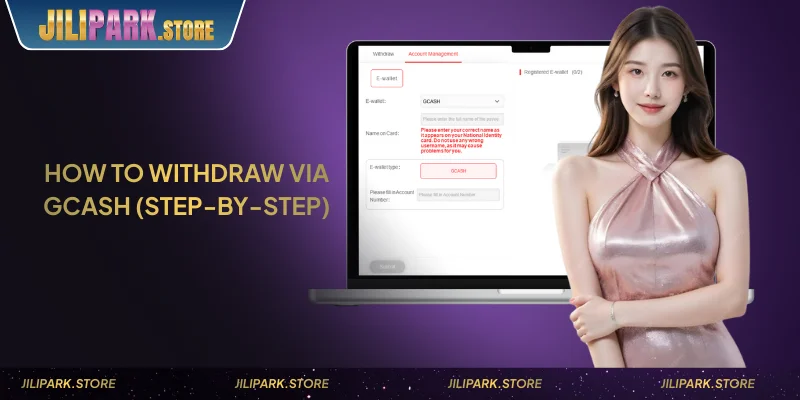
- Log in to your account at jilipark.store
- Go to the Cashier or Withdrawal section from the main menu
- Select GCash as your withdrawal method
- Enter your GCash-linked mobile number in the format 09XXXXXXXXX
- Enter the withdrawal amount, with a minimum of ₱100, a maximum of ₱20,000 per transaction
- Confirm with your transaction password or complete 2FA verification
- Submit the request — funds arrive in your GCash wallet
Keep your GCash app open after submitting. The credit notification usually appears before any email or SMS confirmation from the platform.
How to Withdraw via Maya
The Maya withdrawal process follows the same flow as GCash. The key difference is the name verification step, and Maya accounts registered under a nickname or shortened name will fail the match check.
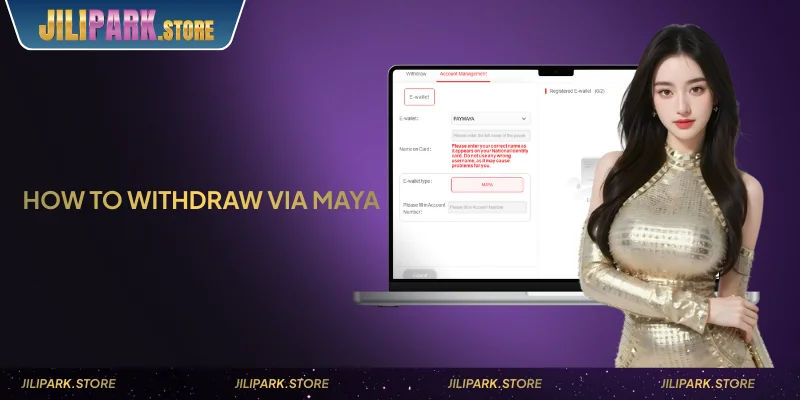
- Log in and go to the Cashier section
- Select Maya / PayMaya as the withdrawal method
- Enter your Maya-linked mobile number
- Enter the amount (₱100 minimum, ₱20,000 maximum)
- Confirm with transaction password or 2FA
- Submit — processing time is comparable to GCash
If your Maya account name differs from your Jilipark registered name, contact 24/7 live chat before submitting. Do not attempt the request, and a failed name-match attempt may delay the resolution process.
Withdrawal Pending or Failed? Common Issues and Fixes
This is the section most players read after something goes wrong. Each issue below has a specific cause and a direct fix.
- KYC not verified: First withdrawal is blocked until identity verification is complete. Submit a valid government ID through the verification section and wait for approval before retrying.
- Name mismatch between wallet and account: This is the most common reason withdrawals are blocked. Contact live chat with your account details and wallet information, and the support team will advise on the correction process. Do not attempt multiple requests while the mismatch is unresolved.
- Turnover requirement not yet met: If your balance includes bonus funds, check the Rewards Center for your current turnover status. Cash balance and bonus balance are tracked separately, and you may be able to withdraw the cash balance even if the bonus turnover is incomplete.
- Daily transaction limit reached: The cap is 10 transactions per day. If you’ve reached it, the next available window opens the following day. Use the maximum ₱20,000 per transaction to minimize the number of requests needed.
- Submitted during maintenance window: The 5-minute daily pause runs from 22:55 to 23:00. Any request submitted in that window may not register. Resubmit after 23:00 if your balance shows no change.
- Amount exceeds ₱20,000 per transaction: Split larger withdrawals into separate requests. Each must be within the ₱100–₱20,000 range.
For unresolved issues, contact 24/7 live chat. Have your transaction ID, registered mobile number, and GCash or Maya number ready before reaching out, and this speeds up resolution significantly.
Earning While You Play – What to Check After Your Withdrawal
Players who withdraw regularly are often in the retention stage of their activity, which means two programs are directly relevant to check.
The Realtime Cashback program credits a percentage of every valid bet back to your account, Slots and Fish at up to 3%, Live Casino and Sports at up to 1.2%, and Poker at up to 1.6%. This accumulates across sessions and is claimable manually or auto-credited at 4:00 AM daily. If you’ve been playing regularly, there may be unclaimed cashback sitting in your account before you withdraw.
The 50-tier VIP program runs on cumulative valid bets, with tiers that are permanent and unlock weekly salary and birthday gift benefits starting from VIP 1. Players who reach VIP 3 also unlock the Agent referral perk. If you’re withdrawing winnings from significant play volume, it’s worth checking which VIP tier your activity qualifies for.
Conclusion
Payouts at Jilipark run through GCash and Maya with zero platform fees, ₱100 minimum, and up to 10 transactions per day. The two conditions that block most first-time withdrawals are KYC not yet verified and a name mismatch between the wallet and registered account. Both are resolvable, and live chat is available 24/7 if either applies.
If you’re withdrawing after a session with significant bet volume, check the Realtime Cashback and VIP sections before requesting, and there may be additional balance already credited to your account.
⚠️ Responsible Gaming: Gaming involves financial risk. Play responsibly. Seek support if gaming affects your daily life. Players must be 21+.
Frequently Asked Questions
No, the withdrawal wallet must be registered in your own legal name and match your Jilipark account name and government ID. Third-party wallet withdrawals are not permitted and will not process.
Per platform policy, modifying bank card details before completing your first withdrawal forfeits winnings associated with the original account setup. Contact live chat immediately if you’ve made changes and have not yet withdrawn.
No, despite references in some homepage marketing copy, USDT withdrawal is not available. The confirmed withdrawal methods are GCash and Maya only. The Withdrawal Guide is the authoritative source, and not banner or mirror-domain pages.
All mirror domains redirect to the same platform. However, always initiate withdrawal requests through the official address jilipark.store to avoid any navigation or session issues.
Cash balance (funds deposited directly, not from bonuses) can be withdrawn at any time as long as KYC is complete and the name match requirement is met. Bonus balance requires the applicable turnover to be completed first. The Cashier section shows both balances separately.
As soon as KYC is verified, and you have an eligible balance. There is no minimum play period, and you just need identity verification approved, and the name match conditions met. The deposit guide has instructions if you need to fund your account first.